We pay for the servers and plans we use. Links marked as affiliate links earn us a commission at no cost to you; it never changes what we recommend. Details.
Three ways to find out your site is down before a customer tells you: run Uptime Kuma yourself, or use the free plan of a hosted service. We read both pricing pages line by line and installed Uptime Kuma on our own server the same day, to see what "free" means in each case.
The free plans, side by side
| Uptime Kuma | Better Stack free | UptimeRobot free | |
|---|---|---|---|
| Price | $0 for the software, plus your server | $0 | $0 |
| Monitors | No plan limit | 10 monitors and heartbeats | 50 monitors |
| Check interval | You set it per monitor | Not stated for the free plan; the page lists "up to 30 seconds" as a feature | 5 minutes |
| Alerts | Configured by you after setup | Slack and e-mail | "Only 5 integrations"; SMS and voice call credits sold separately |
| Status page | Included | 1 | "Basic status pages" |
| Who it is for, in their words | Anyone with a server | "Free for personal projects" | "Good for hobby and non-profit projects" |
| Who keeps it running | You | Better Stack | UptimeRobot |
Two things in the small print matter if this is for a business. Both hosted free plans are described as for personal, hobby or non-profit use. And UptimeRobot's comparison table says "SSL monitoring is included only in paid plans".
What the paid plans cost
| Plan | Price | What changes |
|---|---|---|
| UptimeRobot Solo | $10 a month, or $9 billed annually | 10 monitors, 60-second checks, SSL and DNS monitoring, 3 status pages on your own domain |
| UptimeRobot Team | $41 a month, or $35 billed annually | 100 monitors, 30-second checks, 3 seats |
| Better Stack responder | $34 a month, or $29 billed annually | One responder licence with incident management, on-call, and unlimited phone call and SMS alerts |
| Better Stack extra monitors | $25 a month, or $21 billed annually | 50 more monitors |
Note that UptimeRobot's first paid plan has fewer monitors than its free one: Solo is 10 monitors against 50. What you buy is the 60-second interval, SSL monitoring and a plan that is not labelled for hobby projects, not volume.
The models differ. UptimeRobot charges by monitor count and check speed. Better Stack charges per person who gets paged, and includes phone calls and SMS in that price; UptimeRobot sells SMS and voice call credits as one-time purchases, from $3.00 for 10 credits, on free and paid plans alike.
What "free" Uptime Kuma cost our server
Coolify offers three Uptime Kuma templates: plain (SQLite), with MariaDB and with MySQL. We deployed the plain one.
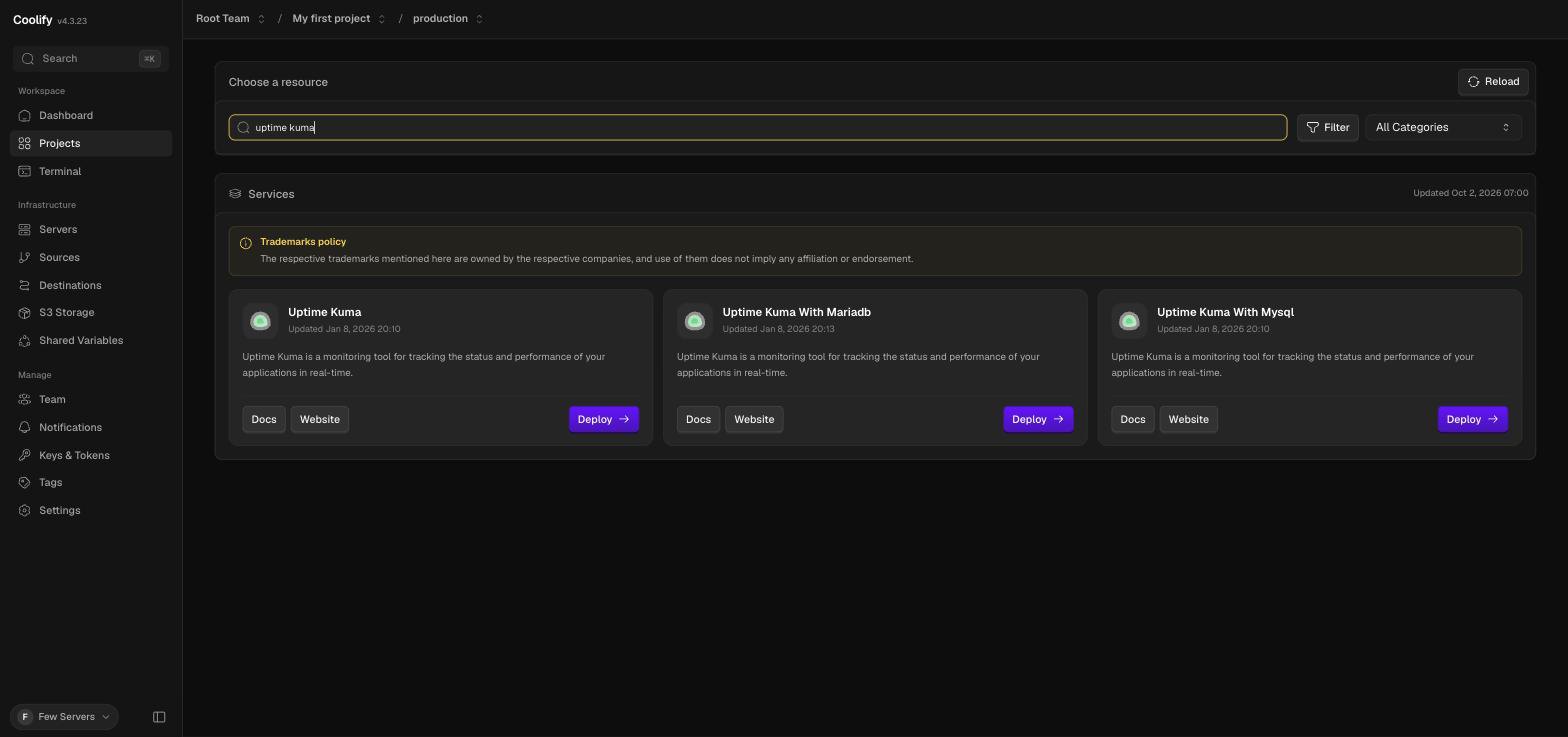
As with n8n, the generated domain starts with http, so we changed it to https first. The same "Use a different port?" warning appeared, this time for port 3001, and Use This Port Anyway saved it correctly.

Then the deploy, timed from outside:
| Measure | Result |
|---|---|
| Image | louislam/uptime-kuma:2 (version 2.5.5), 2.49 GB on disk |
| Deploy click to container start | 5 min 9 s, all of it pulling and extracting the image |
| Deploy click to first answer | 5 min 32 s |
| Deploy click to valid Let's Encrypt certificate | 5 min 46 s |
| Peak during the pull | 800 MB RAM, 1,025 MB swap, load 8.1 on one vCPU |
| Uptime Kuma's memory after start | 61 MB |
| Disk on the droplet | 12 GB before, 14 GB after, of 24 GB |
Once it is running, Uptime Kuma is light: 61 MB. Getting it there is not. A 2.49 GB image is larger than n8n's, and pulling it onto a 1 GB server that already runs Coolify and n8n pushed swap past a gigabyte and the load to 8. The server stayed up, but this is the third heavy image on a 25 GB disk, and 59% of it is now used.
One click did not register on the overloaded dashboard: our first Deploy did nothing, and we only noticed ten minutes later because no container existed. Check that the startup log actually appears.
The first screen is public
Uptime Kuma 2 opens on a database choice, then asks you to create the admin account.
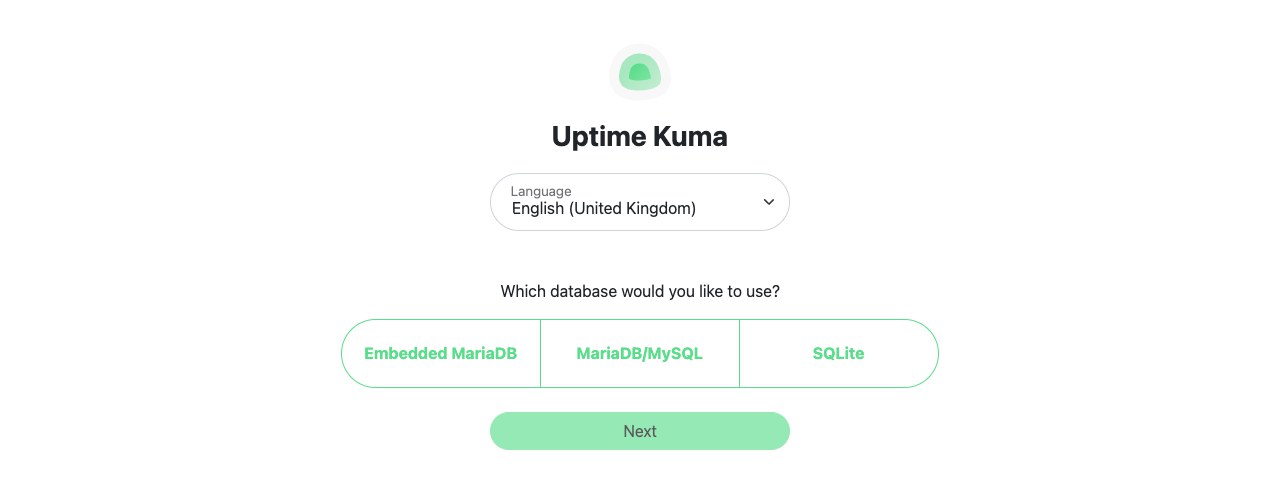
Until that is done, anyone with the URL can do it instead of you. Same rule as every self-hosted tool we have installed: have the page open when the deploy finishes.
The catch with monitoring from the same server
A monitor that runs on the server it watches cannot tell you the server is gone. If the droplet dies, Uptime Kuma dies with it, silently. That is not a flaw in Uptime Kuma; it is where we put it.
So the practical setup for a small team is both: Uptime Kuma for as many internal checks as you like, and one free external monitor from UptimeRobot or Better Stack pointed at the server itself, or at Uptime Kuma's own address.
Which one to pick
- A handful of sites, no server to look after: UptimeRobot free. 50 monitors is the most generous free count, and 5-minute checks are fine for a side project.
- You want to be woken up, and a status page: Better Stack. The free plan covers 10 monitors with Slack and e-mail; phone calls and SMS start with the $29 responder licence.
- You already run a server and want no limits: Uptime Kuma, with room for a 2.5 GB image, plus one external check from either service above.
What we will measure next
Prices and limits are only half of it. The number that matters is how long each one takes to notice an outage. Once the accounts exist we will add the same monitors to all three, stop one of our own apps, and time each alert. That comparison will be a separate hands-on review, linked from here.
FAQ
Is Uptime Kuma really free?
The software is free and open source and has no monitor limits. Running it costs a server: on ours it needed a 2.49 GB image and 61 MB of memory once started, and the install pushed a 1 GB machine to 1,025 MB of swap.
How many monitors does UptimeRobot's free plan include?
50 monitors with a 5-minute check interval, described by UptimeRobot as good for hobby and non-profit projects. SSL monitoring is included only in paid plans, which start at $9 a month billed annually.
What does Better Stack's free plan include?
10 monitors and heartbeats, one status page, and Slack and e-mail alerts, described as free for personal projects. Phone call and SMS alerts come with a responder licence at $29 a month billed annually.
Can I run Uptime Kuma on a 1 GB VPS?
Yes. It used 61 MB after starting on our 1 GB droplet. The hard part is the install: the image is 2.49 GB, so you need a swap file and several gigabytes of free disk.
Should a monitor run on the same server as the app?
Not as the only monitor. If the server fails, the monitor fails with it and no alert is sent. Use an external service for at least one check of the server itself.
Used in this article
- Better StackHosted uptime monitoring with on-call alerts; free plan with 10 monitors.Visit Better Stack
- UptimeRobotHosted uptime monitoring; free plan with 50 monitors at 5-minute checks.Visit UptimeRobot
Affiliate link: we may earn a commission if you sign up, at no cost to you. Details.