We pay for the servers and plans we use. Links marked as affiliate links earn us a commission at no cost to you; it never changes what we recommend. Details.
On 1 October we put Coolify on DigitalOcean's $6 droplet (1 vCPU, 1 GB of RAM), then added n8n with Postgres and Uptime Kuma. On 7 October, after 5 days and 14 hours without a reboot, we logged in and measured where the memory went.
Measured 7 Oct 2026, 04:38 UTC, over SSH on our test droplet
coolify-test(DigitalOcean FRA1, Basic Regular, Ubuntu 24.04.5):free -m,swapon --show,vmstat, the kernel log, and each container's cgroup files (memory.current,memory.swap.current,memory.peak). Versions: Coolify 4.3.23, n8n 2.10.2 with Postgres 16, Uptime Kuma 2 (running since 2 Oct). Prices were read from the providers' pages the same morning.
Watch it: the 5-minute video with every number, plus two Shorts: 5 days later and which process is eating your swap.
What is running on the box
Twelve containers: Coolify's own six (the app, its Postgres, Redis, the realtime server, the Traefik proxy and Sentinel), n8n with its task runner and Postgres, Uptime Kuma, the small Node app from our install guide, and a BuildKit container left over from that app's builds. n8n holds a handful of test workflows, and Kuma watches a few sites. That is light use: a busy n8n would need more.
The numbers after 5 days
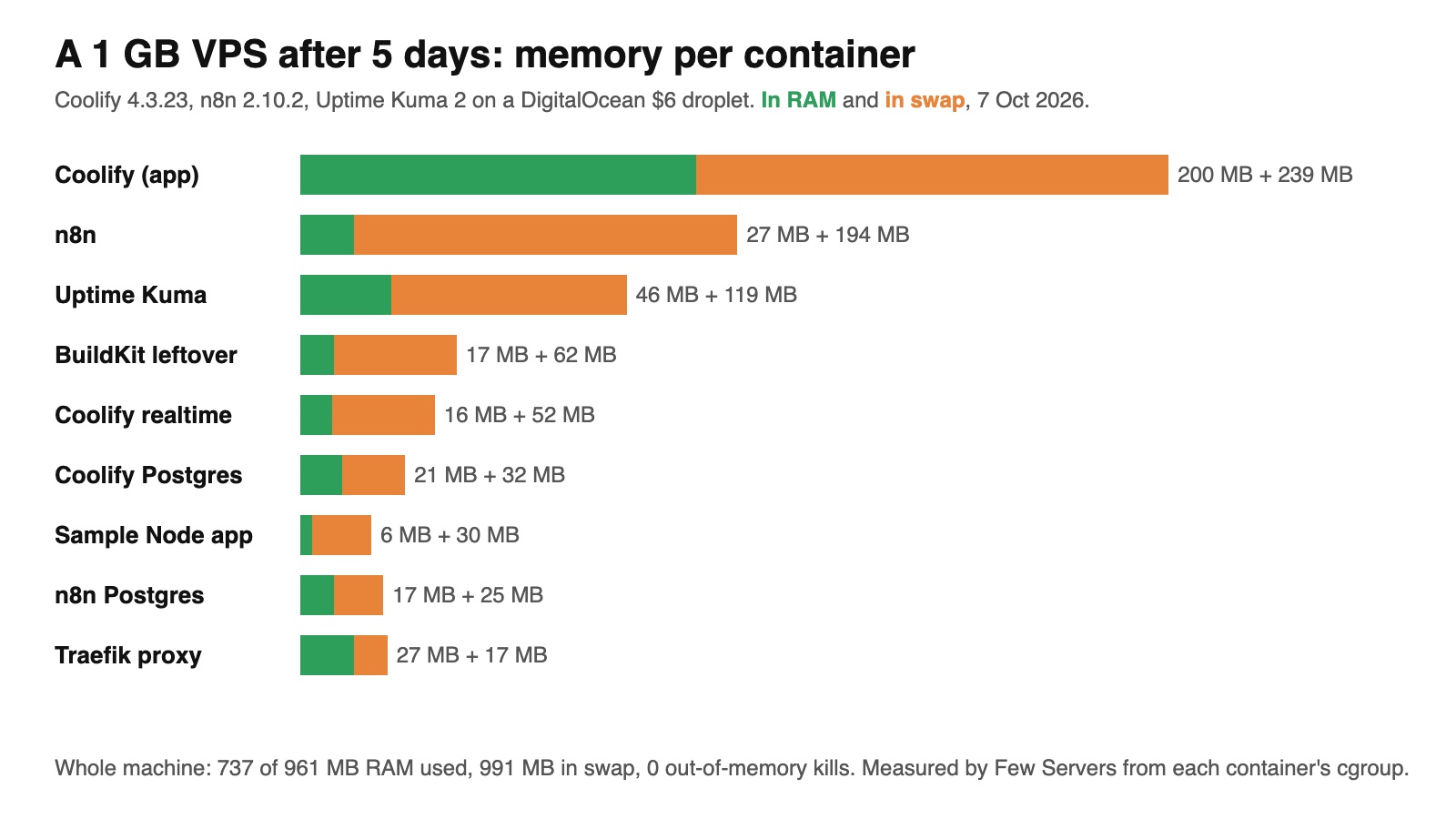
| Container | In RAM | In swap | Peak since start |
|---|---|---|---|
| Coolify (app) | 200 MB | 239 MB | 547 MB |
| n8n | 27 MB | 194 MB | 429 MB |
| Uptime Kuma | 46 MB | 119 MB | 209 MB |
| BuildKit (left over from a build) | 17 MB | 62 MB | 350 MB |
| Coolify realtime | 16 MB | 52 MB | 115 MB |
| Coolify Postgres | 21 MB | 32 MB | 111 MB |
| Sample Node app | 6 MB | 30 MB | 143 MB |
| n8n Postgres | 17 MB | 25 MB | 113 MB |
| Traefik proxy | 27 MB | 17 MB | 79 MB |
| Sentinel, Redis, n8n task runner | 23 MB | 8 MB | 60 MB together |
Whole machine: 737 MB used of 961 MB, 224 MB available, 991 MB of swap in use out of 2 GB. The containers above add up to about 400 MB in RAM and 780 MB in swap; the rest is Docker, the kernel and the page cache.
Three things stand out. n8n is the biggest app here, about 220 MB counting swap, with a peak of 429 MB. Coolify itself is larger than both apps together, about 630 MB across its six containers. And the BuildKit container, which only matters during builds, still holds 79 MB.
Is it slow?
Less than you would expect. Timed on the server itself, the first n8n health check took 138 ms, then 46 and 37 ms. Uptime Kuma's dashboard took 55, 44 and 38 ms. The kernel log has no out-of-memory kill since 1 October.
The cost shows up elsewhere. vmstat says the kernel has read 186 GB back from swap since boot, an average of 402 KB per second, and written 171 GB out. The disk is busy all day moving the same pages back and forth. It works, but a heavy workflow run or a build on top of it is exactly what would push it over.
Three fixes that cost nothing
- Remove the leftover BuildKit container if you build elsewhere:
docker rm -f buildx_buildkit_coolify-railpack0frees about 79 MB. We have not yet checked what the next build on the server does without it, so try this on a box you build elsewhere for. - See what is really in swap before guessing. This prints the biggest users in KB:
for p in /proc/[0-9]*; do awk -v c="$(cat $p/comm)" '/VmSwap/{if($2>10240)print $2, c}' $p/status; done | sort -rn | headOn our box the top line was 189464 MainThread: that is n8n's Node.js process (we matched it by its command line, node /usr/local/bin/n8n), then uptime-kuma with 98 MB.
- Keep the swap file. Without it, this exact setup needs about 1.7 GB and would hit the out-of-memory killer. The commands are in step 2 of the install guide, and the starter kit sizes it for you.
When to move up, and to what
The rule we would use: stay on 1 GB for a test box or personal workflows, move up the day anyone else depends on it. Prices read on 7 Oct 2026:
| Plan | RAM | Price per month | Fits these numbers? |
|---|---|---|---|
| DigitalOcean Basic, 1 vCPU | 1 GB | $6 | Only with swap (this test) |
| DigitalOcean Basic, 1 vCPU | 2 GB | $12 | Just: 1.7 GB of demand |
| DigitalOcean Basic, 2 vCPUs | 4 GB | $24 | Yes, with room for builds |
| Database Mart Express Linux VPS, 2 cores | 4 GB | $5.99 | Yes on paper, shared IP, US only |
Tested on a DigitalOcean 1 GB droplet; these plans meet the numbers we measured. We have not run this stack on the 2 GB or 4 GB droplets or on Database Mart. What Database Mart's low price leaves out (a shared IP address, US data centres, no refunds) is in Database Mart VPS pricing explained, and how the memory looked on day one is in Can Coolify run on 1 GB of RAM?.
FAQ
How much RAM does n8n use?
On our server, with a few light test workflows, about 220 MB: 27 MB in RAM and 194 MB in swap after 5 days, with a peak of 429 MB since it started. Its Postgres used another 42 MB. Heavy workflows will use more.
How much RAM does Uptime Kuma use?
About 165 MB after 5 days (46 MB in RAM, 119 MB in swap), with a peak of 209 MB. It watched a few sites on SQLite.
Can I run n8n on a 1 GB VPS?
Yes, with a swap file, and it kept working for 5 days for us. Next to Coolify the whole machine needed about 1.7 GB, so 991 MB of it lived in swap. For production use, take 2 GB or more.
Does swap make the apps slow?
Not much for light use: pages answered in about 40 ms on the server after the first request. The cost is disk activity, an average of 402 KB per second read back from swap, which leaves little headroom for builds or heavy runs.
How do I check swap use per container?
Read the cgroup files: cat /sys/fs/cgroup/system.slice/docker-<container id>.scope/memory.swap.current gives bytes in swap for one container, and memory.current gives the RAM.
Used in this article
- DigitalOceanThe $6 Basic droplet (1 vCPU, 1 GB RAM, 25 GB SSD) our test server runs on.Visit DigitalOcean
- Database MartVPS, dedicated and GPU servers. Affiliate link (Awin).Visit Database Mart
Affiliate link: we may earn a commission if you sign up, at no cost to you. Details.