Playwright MCP is the server that lets an AI agent drive a real browser: open a page, read it, click, type, take a screenshot. It is published by Microsoft, and npm reported 8.5 million downloads for it in the week of 24 to 30 September 2026. We installed it, talked to it directly over the protocol and wrote down what it returned.
Watch it instead
The same test as a 5-minute video, with the numbers on screen: Playwright MCP explained and tested (YouTube). The 48-second version: what Playwright MCP really costs.
What it is
From the project's README: "A Model Context Protocol (MCP) server that provides browser automation capabilities using Playwright. This server enables LLMs to interact with web pages through structured accessibility snapshots, bypassing the need for screenshots or visually-tuned models."
The important word is snapshots. The server does not show the model a picture of the page by default. It hands over the accessibility tree as text, where every element has a reference such as e46, and the model acts by naming a reference.
In the official MCP Registry it is listed as io.github.microsoft/playwright-mcp, under Microsoft's GitHub namespace. The registry entry said version 0.0.82 on the day we checked; npm's latest tag was already 0.0.83, published on 28 September 2026. The package requires Node 18 or newer.
Install
There is nothing to install by hand. Every MCP client starts it through npx. The standard configuration from the README:
{
  "mcpServers": {
    "playwright": {
      "command": "npx",
      "args": ["@playwright/mcp@latest"]
    }
  }
}
For Claude Code it is one command:
claude mcp add playwright npx @playwright/mcp@latestWe added two flags for the test, and we would keep both on a server or in CI: --headless (the browser is headed by default, so a window opens) and --isolated (a fresh profile per session instead of a persistent one on disk).
It launched the Google Chrome that was already on the machine (we checked the process list). No browser was downloaded: the npx cache held 18 MB after the first run.
What we measured
| Measure | Result |
|---|---|
First npx run (downloads the package) | 6.2 s |
| Second run, package cached | 1.3 s |
Process start to initialize answered, 4 runs | 1.27 to 1.53 s |
Tools returned by tools/list | 25 |
| Size of the tool definitions | 21,332 bytes of JSON |
| Memory before any page is opened | 253 MB (2 processes) |
First browser_navigate, including Chrome launch, 4 runs | 1.71 to 2.62 s |
| Memory with one page open | 840 to 960 MB (9 processes) |
browser_snapshot of an already loaded page | 0.02 s |
browser_take_screenshot | 0.05 to 0.11 s |
Memory after browser_close | 157 MB |
The server reports itself as "Playwright", version 1.64.0-alpha, and negotiated MCP protocol version 2025-06-18. It declares one capability: tools. No resources, no prompts.
A real session
We pointed it at our own MCP server directory and had it use the search box, with four tool calls.
browser_navigate to the page answered in 2.3 seconds with the page title and a link to a snapshot file. Each answer also includes the Playwright code the server ran, which is useful when you later want the same steps as a test:
await page.goto('https://www.fewservers.com/mcp/');browser_find with the text "Search all" located the search box and returned its reference, e46, in 410 characters. Then browser_type with that reference and the text "stripe":
await page.getByRole('searchbox', { name: 'Search all servers' }).fill('stripe');browser_wait_for waited 0.83 seconds for "com.stripe/mcp" to appear, and a second browser_find confirmed the result line: "41 servers, showing 30". The screenshot below was taken by the server itself with browser_take_screenshot.
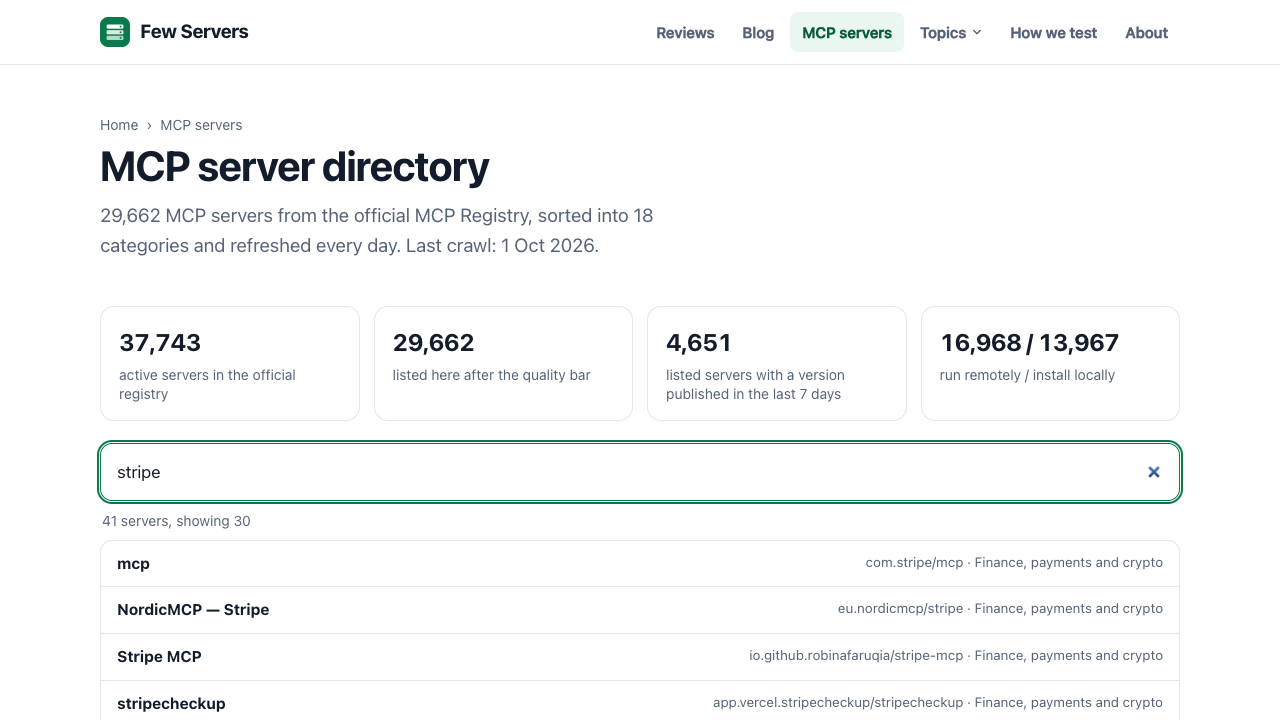
It also showed us a flaw in our own page: Stripe's entry was displayed as "mcp", because the registry entry has no title and we fell back to the last part of the name. We fixed that the same day.
The 25 tools
Seven tools are marked read-only by the server. The other 18 carry the destructive hint, which is how the protocol says "this changes something".
| Tool | What the server says it does | Kind |
|---|---|---|
browser_console_messages | Returns all console messages | Read-only |
browser_find | Search the accessibility snapshot of the current page for text or a regular expression | Read-only |
browser_network_request | Returns full details (headers and body) of a single network request | Read-only |
browser_network_requests | Returns a numbered list of network requests since loading the page | Read-only |
browser_snapshot | Capture accessibility snapshot of the current page, this is better than screenshot | Read-only |
browser_take_screenshot | Take a screenshot of the current page | Read-only |
browser_wait_for | Wait for text to appear or disappear or a specified time to pass | Read-only |
browser_click | Perform click on a web page | Changes state |
browser_close | Close the page | Changes state |
browser_drag | Perform drag and drop between two elements | Changes state |
browser_drop | Drop files or MIME-typed data onto an element, as if dragged from outside the page | Changes state |
browser_emulate_media | Emulate CSS media features for the page, for example the light and dark color scheme | Changes state |
browser_evaluate | Evaluate JavaScript expression on page or element | Changes state |
browser_file_upload | Upload one or multiple files | Changes state |
browser_fill_form | Fill multiple form fields | Changes state |
browser_handle_dialog | Handle a dialog | Changes state |
browser_hover | Hover over element on page | Changes state |
browser_navigate | Navigate to a URL | Changes state |
browser_navigate_back | Go back to the previous page in the history | Changes state |
browser_press_key | Press a key on the keyboard | Changes state |
browser_resize | Resize the browser window | Changes state |
browser_run_code_unsafe | Run a Playwright code snippet | Changes state |
browser_select_option | Select an option in a dropdown | Changes state |
browser_tabs | List, create, close, or select a browser tab | Changes state |
browser_type | Type text into editable element | Changes state |
Three more groups can be switched on with --caps: vision, pdf and devtools. We tested the default set only.
What it costs in tokens
Two numbers decide whether this server is cheap or expensive for your agent.
The tool definitions: 21,332 bytes. Every MCP client loads them into the model's context for as long as the server is connected. At roughly four characters per token that is about 5,000 tokens before the first page opens. That figure is an estimate; the byte count is measured.
The snapshots. A full browser_snapshot of our directory page was 32,732 characters, roughly 8,000 tokens by the same estimate, and an agent that snapshots after every click pays that each time. browser_find is the cheaper tool: 410 characters to locate the search box, 711 to read the result line.
| Call on the same page | Characters returned |
|---|---|
browser_snapshot | 32,732 |
browser_snapshot with --mobile | 32,281 |
browser_find for the search box | 410 |
browser_navigate (title plus a link to the snapshot file) | 291 |
The help text says of --mobile that "mobile pages are usually lighter, which saves tokens". On our page it saved 1.4%, because the page serves the same content at every width. Test it on the site you care about before relying on it.
The README is candid about this. It says coding agents increasingly prefer command-line workflows "because CLI invocations are more token-efficient: they avoid loading large tool schemas and verbose accessibility trees into the model context", and points to a Playwright CLI for that case.
Things to know before you rely on it
- It writes files where you start it. After each run we found a
.playwright-mcpfolder in the working directory holding the page snapshot as a.ymlfile and the screenshot as a.png. Add it to.gitignore, or it ends up in a commit. - Chrome is the memory, not the server. 253 MB before a page opens, 840 to 960 MB with one page, across nine processes. On the 1 GB server from our Coolify test that would be most of the machine.
- One tool runs arbitrary code. The description of
browser_run_code_unsafesays it "executes arbitrary JavaScript in the Playwright server process and is RCE-equivalent". It is in the default set. If your client lets you disable individual tools, this is the one to look at. - The origin filters are not a sandbox.
--allowed-originsand--blocked-originsexist, and the help text states that each "does not serve as a security boundary". - The default profile is persistent. Without
--isolated, logins survive between sessions in a profile under the Playwright cache folder. That is convenient on a laptop and a liability on a shared machine. - File access is limited to the workspace by default. Navigating to
file://URLs is blocked unless you pass--allow-unrestricted-file-access.
Who it is for
Use it when an agent has to operate a page that has no API: checking that a deploy rendered, filling a form in an admin panel, reading a dashboard, reproducing a bug. It started quickly, needed no credentials, and every call we made worked the first time.
Think twice when the job is high-volume scraping or a long test suite. Each full snapshot costs thousands of tokens, and the browser wants close to a gigabyte. A script, or the CLI the project itself recommends for coding agents, does that work for less.
Other browser and web-data servers are in the directory's browser category, and how we collected them is in our crawl of the MCP Registry.
FAQ
What is Playwright MCP?
It is an MCP server from Microsoft that gives an AI agent control of a browser through Playwright. The agent reads pages as structured accessibility snapshots and acts with tools such as click, type and navigate. Version 0.0.83 exposed 25 tools in our test.
How do I install Playwright MCP?
Add it to your MCP client with the command npx @playwright/mcp@latest. In Claude Code that is claude mcp add playwright npx @playwright/mcp@latest. It needs Node 18 or newer and no API key. In our test it used the Chrome already installed on the machine.
Does Playwright MCP need a vision model?
No. By default it works from the page's accessibility tree as text, and the README says no vision models are needed. A screenshot tool exists, and its description notes that you cannot perform actions based on the screenshot; actions use snapshot references.
How much memory does Playwright MCP use?
On our machine the server used 253 MB before a page was opened and 840 to 960 MB with one page open in headless Chrome, spread over nine processes. After closing the page it dropped to 157 MB.
How many tokens does Playwright MCP use?
The tool definitions were 21,332 bytes, roughly 5,000 tokens loaded for the whole session. A full snapshot of one page was 32,732 characters, roughly 8,000 tokens. The find tool returned 410 characters for the same page, so searching the snapshot is far cheaper than reading all of it.
Is Playwright MCP safe?
It runs a real browser with whatever access that browser has, 18 of its 25 tools change state, and one of them runs arbitrary code by design. Run it with an isolated profile, keep it away from sessions that are logged in to things that matter, and do not treat the origin allowlist as a security boundary: the server's own help text says it is not one.